.svg)


This content is for educational purposes only and does not constitute financial advice. Always do your own research before making any trading decisions.
Perpetual futures trading has become an important part of crypto markets. Surge brings this feature to the Radix ecosystem as its first perpetual DEX. With Surge, traders can take positions on whether asset prices will go up or down, using leverage to increase their potential profits (and losses). This tutorial will explain how perpetual trading works, how to manage your trades, and what makes Surge different.
What Are Perpetual Futures?
Perpetual futures are a type of trading contract that lets you take positions on price changes without a fixed end date. Regular futures contracts expire on a specific date. Perpetual contracts can stay open as long as you have enough money in your account to cover potential losses.
On Surge, you don't trade real assets. Instead, you trade synthetic positions that follow the price of assets. An oracle (a system that brings real-world price data onto the blockchain) provides accurate prices from multiple sources. All your profits, losses, and liquidations use these oracle prices. This means you can trade BTC or ETH without actually owning any.
The funding rate is a mechanism that keeps the system balanced. When more people are betting prices will rise (going long), they pay a fee to people betting prices will fall (going short). When the opposite happens, shorts pay longs. This encourages traders to take the less popular side, which helps keep the system stable.
Going Long means you think the price will rise. You make money when it goes up and lose money when it goes down.
Going Short means you think the price will fall. You make money when it drops and lose money when it rises.
Leverage multiplies both your gains and losses. With 10x leverage, if the price moves 5%, you gain or lose 50%.
On Surge, you can trade BTC, ETH, SOL, XRD, SUI, DOGE, ADA, and BNB against USD.
You can use up to 50x leverage. All positions show their value in USD, which makes calculations easier.
How Trading Works on Surge
The Cross-Margin System
Margin is the money you put down as collateral for your trades. It's like a deposit that guarantees you can pay if you lose money. If you want to control a $1,000 position with 10x leverage, you only need $100 of margin.
Surge uses cross-margin. This means all your trades share the same pool of collateral. If you have multiple positions open, profits from one can cover losses from another. This gives you more flexibility, but it also means a big loss in one trade can affect all your other trades.
Cross-margin is automatic on Surge meaning you don't need to turn it on. If you have a profitable BTC position and a losing ETH position, the BTC profits help keep the ETH position open. But if one position loses too much money, all your positions might get liquidated (forcibly closed).
Your account balance includes your deposited money plus any profits or losses from open trades. This total determines how much you can trade and when you might get liquidated.
Supported Collateral
You can deposit different types of assets as collateral on Surge:
- xUSDC
- sUSD
- xwBTC and hWBTC
- xETH and hETH
- LSULP
- XRD
All these assets count toward your total margin. There's no minimum deposit, so you can start with any amount you're comfortable with.
Getting Started with Trading
Step 1: Connect and Create Your Trading Account
- Go to surge.trade
- Connect your Radix Wallet
- Choose your Persona
- Create a new trading account - you can either:
- Deposit money when you create the account
- Create an empty account and deposit later
- Sign the transaction to create your account
To add money to your account:
- Click "Deposit" or the bank icon
- Select account
- Choose which asset to deposit
- Enter the amount
- Confirm in your wallet
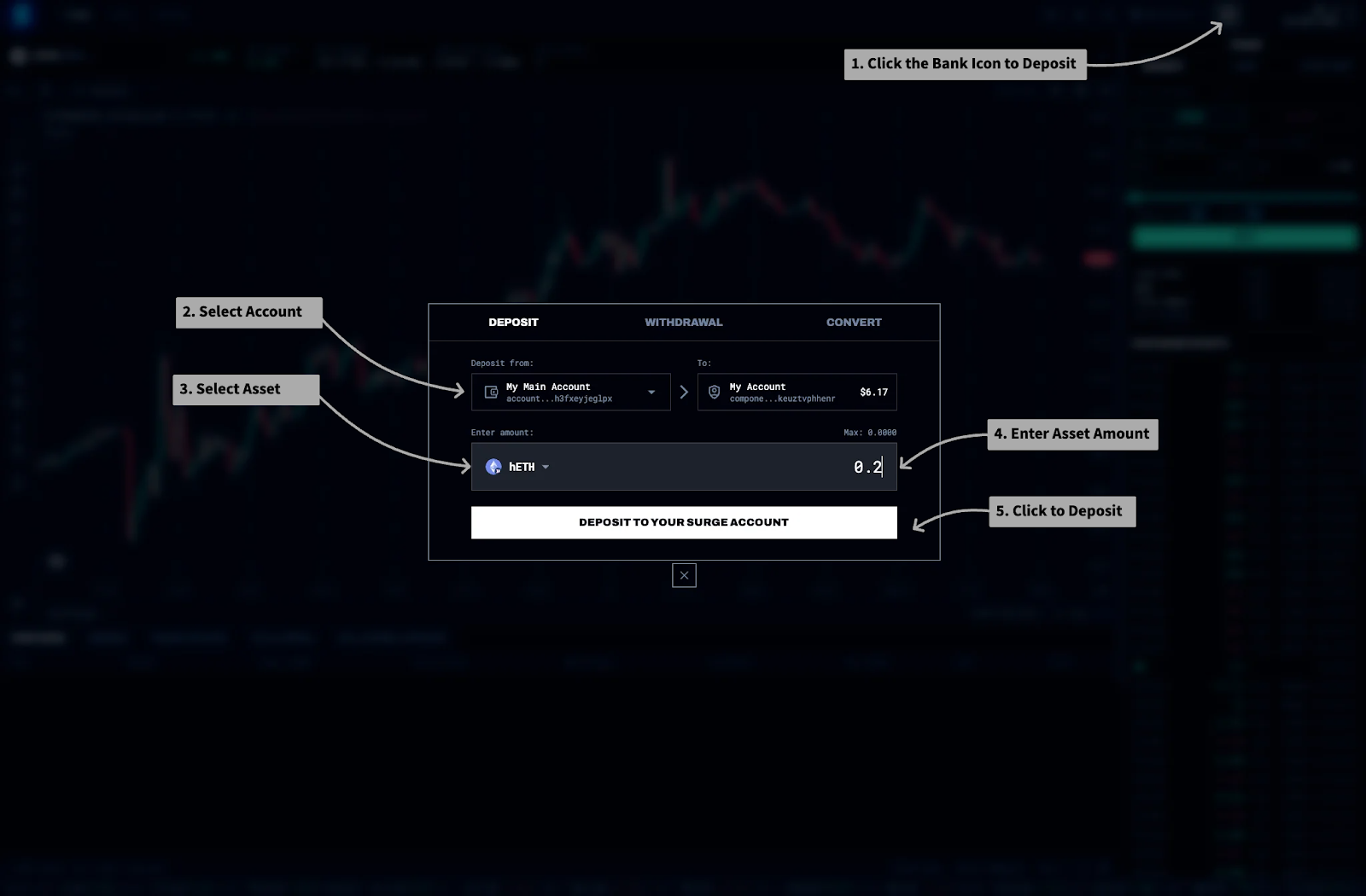
Your deposit becomes available for trading immediately. You'll see your account value, available margin, and current positions in the top right corner.
Step 2: Understanding the Trading Interface
The interface shows:
- Price Chart: Current price movements for your chosen pair
- Order Panel: Where you place your trades
- Positions Tab: Your open trades and their profit/loss
- Trade History: Your recent trades
- Account Overview: Your total money, margin use, and risk level
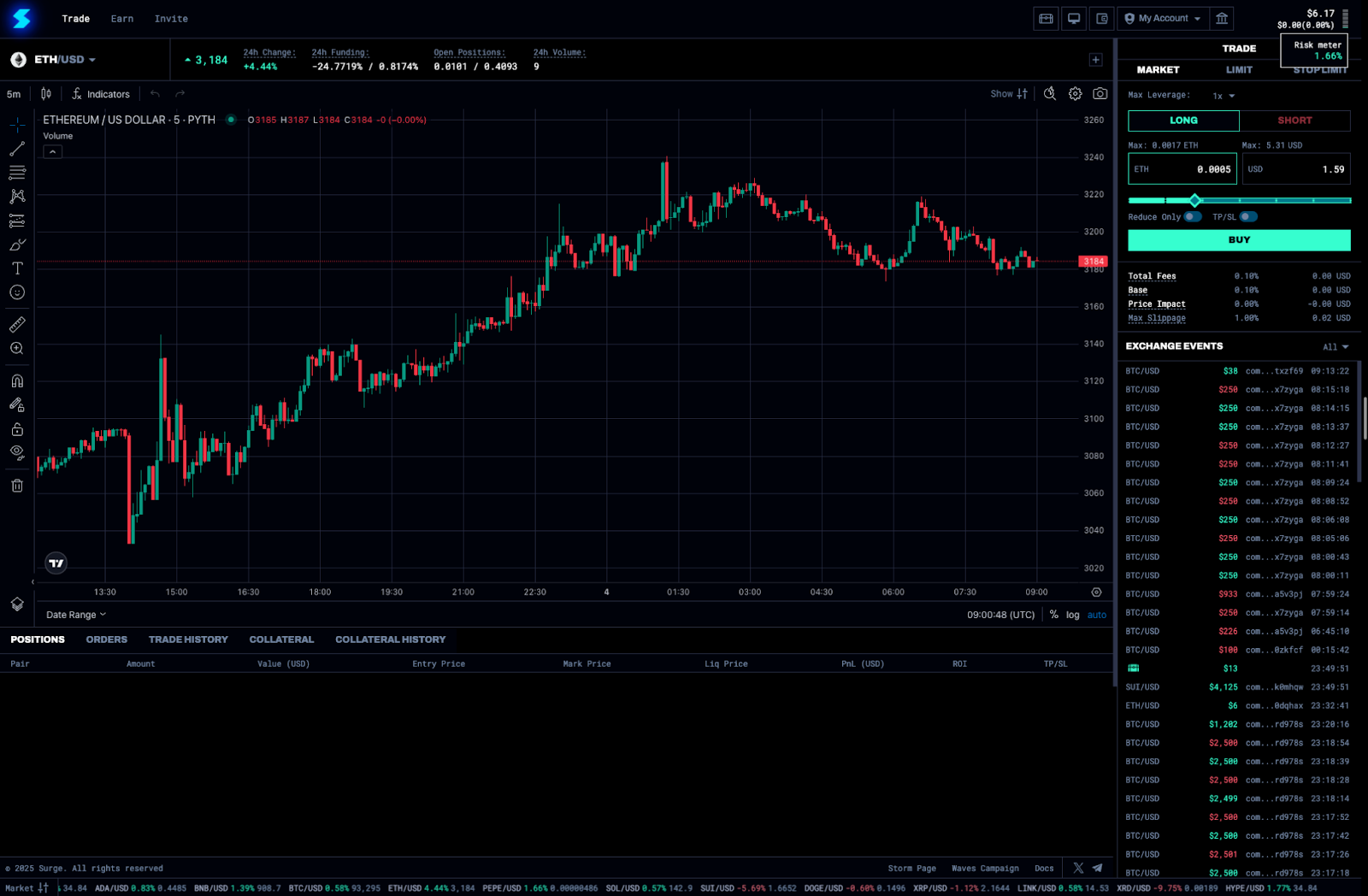
The risk meter shows how much of your margin you're using. Green means safe. Red means you're close to liquidation. Keep it below 100% to avoid forced closure.
Step 3: Opening Your First Position
To open a position:
- Choose Your Pair: Pick BTC, ETH, SOL, XRD, or another supported asset
- Pick Direction: Click "Long" if you think prices will rise, "Short" if you think they'll fall
- Enter Size: Type how much you want to trade (in USD or the asset)
- Set Leverage: Start low while you're learning. You can go up to 50x, but higher leverage means higher risk
- Check Fees: Look at the fee and any price impact
- Place Order: Click "Buy/Long" or "Sell/Short" to trade
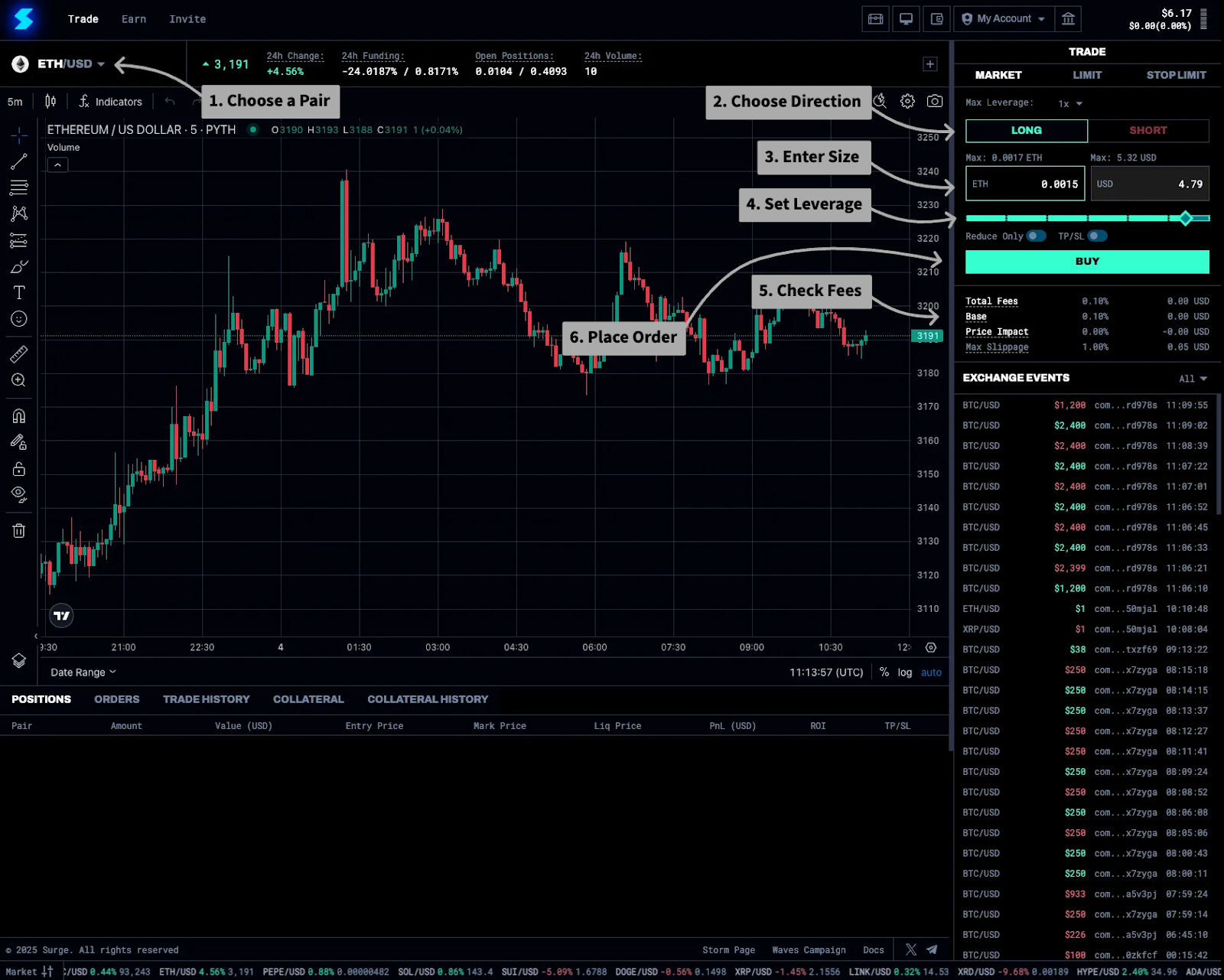
Your position appears in the positions tab immediately, showing your entry price, current profit/loss, and funding payments.
Order Types and Execution
Market Orders
Market orders execute right away at the current price. They're quick and simple but might cost more for large trades. Use market orders when you need to trade immediately and the fee is acceptable.
Limit Orders
Limit orders let you choose your entry price. They only execute if the market reaches that price. This avoids slippage but might not execute at all. Keepers (automated systems) monitor these orders and execute them when your conditions are met. There's no extra fee beyond the standard trading fee.
Stop Limit Orders
Stop limit orders combine a trigger price with a limit price. When the market hits your stop price, it places a limit order. This helps you set exit points or enter trades when momentum picks up. These also need keepers to execute.
Reduce Only and TP/SL
The "Reduce Only" option makes sure orders only make your position smaller, not bigger. This prevents accidents when you're trying to exit. Take Profit (TP) and Stop Loss (SL) orders automatically close your position at your target profit or maximum acceptable loss.
Managing Open Positions
Monitoring Your Trades
Each position shows:
- Unrealized P&L: What you'd gain or lose if you closed now
- Entry Price: Your average price across all trades
- Mark Price: Current oracle price for calculating profit/loss
- Liquidation Price: The price that triggers forced closure
- Funding: Fees you've earned or owe
Positions update as prices change. Green means profit, red means loss. The percentage shows your return based on the margin used.
Adding or Reducing Positions
You can change positions after opening them:
- Add More: Trade in the same direction to increase size (this changes your average entry price)
- Reduce: Trade in the opposite direction with "Reduce Only" checked
- Flip: Trade a larger amount in the opposite direction to reverse your position
Understanding Funding Rates
Funding rates balance supply and demand between longs and shorts. The rates appear above the chart for each pair.
If BTC shows 0.23% / -0.45%, longs pay 0.23% daily and shorts earn 0.45% daily. Funding builds up from when you open your position and settles when you make any trade in that pair. For positions held for days or weeks, funding costs can add up.
Risk Management
Liquidation Mechanics
Surge requires a 1% maintenance margin which is the minimum amount of collateral value you must keep in your account to prevent your positions from being automatically closed at a loss. If your account value falls below this compared to your position size, liquidation happens automatically. Keepers constantly check accounts and trigger liquidations to protect the protocol.
Bad debt happens when liquidation can't recover enough value to cover the position, usually during extreme price movements. The protocol has safeguards, but bad debt is a loss the system must absorb.
The risk meter helps you see your margin usage. During liquidation, your entire position closes at market price and you lose your remaining margin.
Managing Multiple Positions
With cross-margin, all positions affect your risk:
- Similar positions (all longs or all shorts) increase risk
- Mixed positions (some longs, some shorts) can reduce risk
- Watch your total account leverage, not just individual trades
- Remember that closing one position affects the others
Spreading trades across different assets can help, but remember that crypto prices often move together during big market events.
Fees and Costs
Trading Fees
Every trade incurs a different fee based on the pair. For now, let’s assume a 0.10% base fee on the position size. For a $1,000 position, you pay $1 to open and another $1 to close. Larger trades may have additional price impact fees if they significantly affect the market.
Funding Costs
Funding can be a major cost or income source:
- Holding positions on the crowded side costs money
- Holding on the less popular side earns money
- Rates change based on market balance
- Think about funding when planning how long to hold
A position earning 0.5% daily can quickly cover trading fees. A position paying 0.5% daily can eat into profits even on winning trades.
Closing Positions
Manual Closing
To close a position:
- Go to your positions tab
- Click "Close" on the position
- Confirm the size (you can close part of a position)
- Check the fees and final profit/loss
- Confirm in your Radix Wallet
The position disappears and your profit/loss shows in your account balance. Any funding payments also settle now.
Automatic Closing
Positions close automatically when:
- Stop loss orders trigger
- Take profit targets are reached
- You hit the liquidation threshold
- Auto-deleveraging happens (rare, during extreme market events)
Setting stop losses helps manage risk, but extreme volatility can cause slippage past your stop price.
Conclusion
Trading perpetuals on Surge offers powerful ways to profit from crypto price movements using leverage. The cross-margin system, multiple collateral options, and up to 50x leverage enable advanced strategies that weren't available on Radix before.
Success requires understanding both the opportunities and the risks. Start small, focus on managing risk, and slowly increase complexity as you gain experience. The decentralized nature means dealing with keepers and oracle prices, but it also means transparent, open access to leveraged trading.
Ready to start trading? Visit surge.trade, fund your account, and begin trading.
Disclaimer: This tutorial is for educational purposes only. Trading perpetual futures involves significant risk including total loss of funds. Past performance does not guarantee future results. Always conduct your own research and trade responsibly.